FOCUS report
Last updated on
Understanding cloud cost and usage data is a key skill for effective cost management. At STACKIT, we provide all cost and usage data in a standardized format to help you achieve this understanding. This format is the FinOps Open Cost and Usage Specification (FOCUS). STACKIT supports the FOCUS versions 1.1 and 1.2.
What is FOCUS?
Section titled “What is FOCUS?”The FinOps Open Cost and Usage Specification (FOCUS) is an open specification that defines clear requirements for billing data generators to produce consistent cost and usage datasets.
By supporting this standard, STACKIT enables you to integrate cost and usage data directly into your existing processes and tools. The FOCUS export provides the fundamental data needed to perform FinOps practices, including:
- Accurate cost allocation: Assign costs from the resource to the owners, such as teams, products, or business units.
- Analyzing cost data: Identify cost trends and drivers.
- Cost monitoring: Set alerts, track budgets, and measure cost metrics.
To assign costs to specific teams, products, or business units, you can assign labels to your resources. Labels appear in the tags column of the FOCUS report.
For more details about FOCUS, see https://focus.finops.org. For more information about FinOps, see https://www.finops.org/.
Feature overview
Section titled “Feature overview”| Feature | Details |
|---|---|
| FOCUS versions | 1.1 and 1.2 |
| Scope | Billing account level. Each customer account currently contains one billing account. |
| Columns | All mandatory (MUST) columns of the FOCUS specification |
| STACKIT-specific columns | Additional columns with the x_ prefix |
| Reporting types | Month-to-date, day-to-date |
| Reporting frequency | Daily, monthly |
| Report format | Compressed CSV |
| Overwriting | Overwrite older files to save Object Storage space. |
| Reseller support | Through the reseller customer account. The report contains the costs of your end customers and your own costs. Partner Portal integration is planned. |
Not every FOCUS column contains the values that the specification defines. For details, see FOCUS conformance gaps.
How the FOCUS export works
Section titled “How the FOCUS export works”The process for enabling and receiving the FOCUS report involves the following steps:
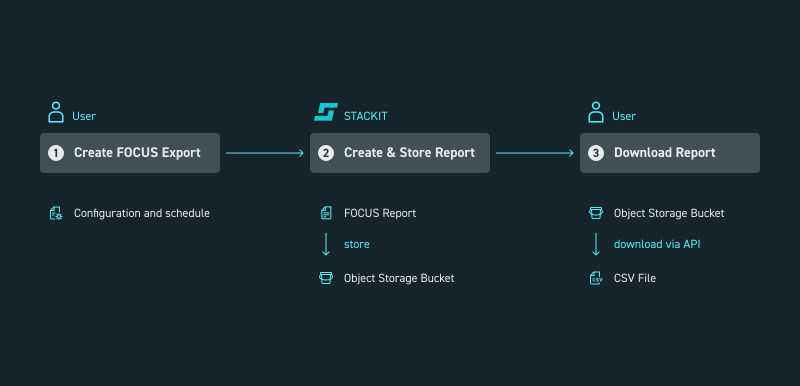
Picture 1: Process to enable the FOCUS report
- You create a FOCUS export schedule.
- STACKIT creates the FOCUS report based on your settings and stores it in your Object Storage at 12:00 UTC.
- You download the report from Object Storage using an API or file transfer client.
For details about the storage path and invoice data in the report, see FOCUS report storage and invoice data.
Access and permissions
Section titled “Access and permissions”You can find the FOCUS report section in the side navigation menu at the customer account level. To see this navigation option, you must have the appropriate role assigned to your user. The role must be assigned to the users on the customer account level.
To assign a role, open the side navigation, select IAM and Management, and then select Access. You must assign one of the following roles to access cost and billing data:
| Access level | Role | Rights |
|---|---|---|
| Customer Account | Owner (General Roles) | Read and write schedules |
| Customer Account | Cost Management Cost Admin (Product Roles) | Read and write schedules |
| Customer Account | Cost Management Cost Reader (Product Roles) | Read schedules |
Planned features
Section titled “Planned features”- FOCUS conformant report certification.
- Additional support columns, such as:
Resource name: This is a human readable name to identify the resource.Folder path: Supports cost allocation.
- FOCUS 1.3 adoption.
- Partner Portal integration for reseller FOCUS reports.
Example FOCUS report
Section titled “Example FOCUS report”To help you familiarize yourself with the report structure and content, you can download an example FOCUS report.
Download FOCUS example